
In Part 1 of this blog we described the basic model: point a Blob Expansion at a Kafka topic, declare the columns you need, and VAST parses each message into a typed table as the message is ingested. The expansion runs in the same transaction as the produce operation. Here, we’ll walk through the setup and the results.
We will produce order records as JSON to a Kafka topic and query them back as typed columns. There is no consumer group or separate processing pipeline. We will then send malformed messages to the same topic and look at the diagnostic columns, followed by a schema change without recreating the expansion.
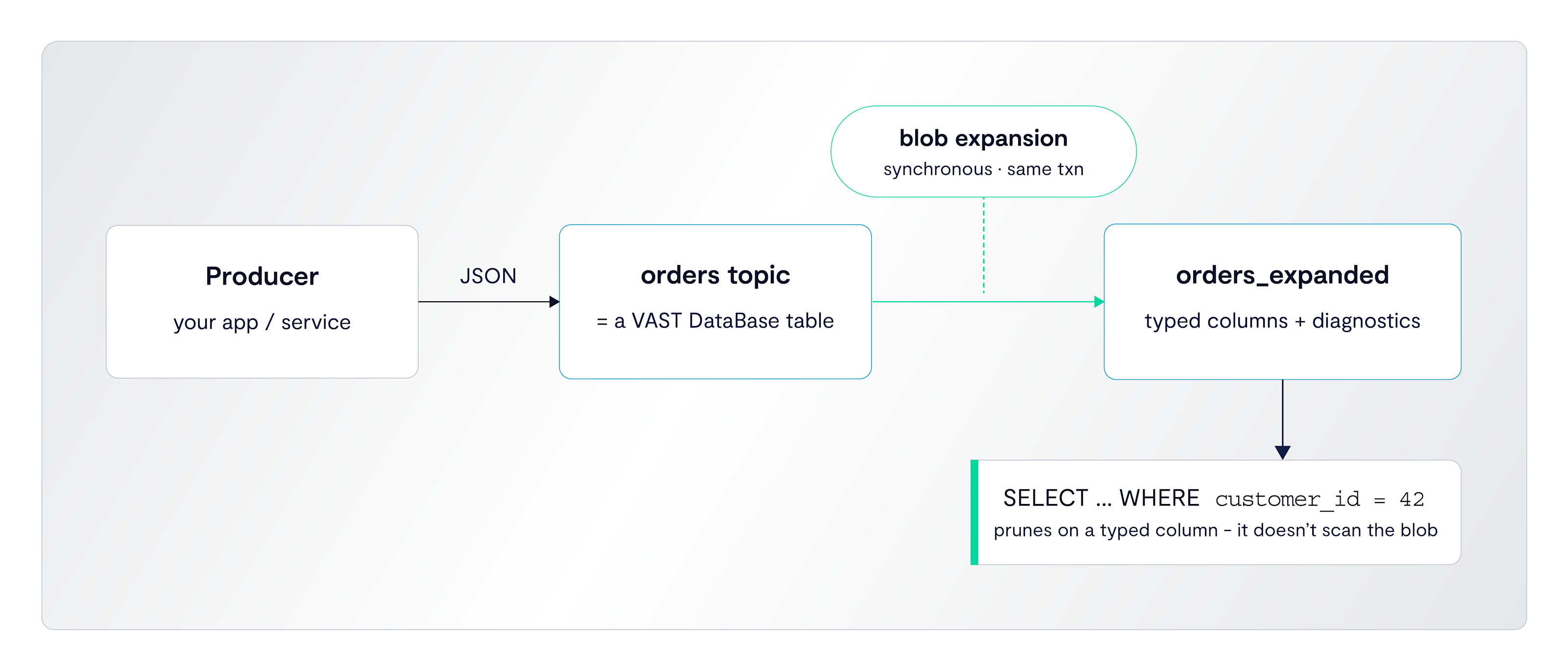
The expansion converts JSON on the topic into columns in the target table as the message is ingested.
The examples below use output from a release-5.5.0-sp1 cluster. The setup is small and does not require a separate streaming engine or consumer group. On the client side, we use the kafka-python and VAST DataBase Python packages. Blob Expansion is a first-class database object, managed through the GUI, CLI, REST API or Python SDK like the topic and target tables. Most of the setup here uses code and CLI commands, with GUI screenshots for the expansion configuration.
1. Configure a Kafka-Enabled View
There is no separate Kafka installation for this example. The VAST Event Broker is part of the VAST AI OS, so the Kafka endpoint is created as a view using the KAFKA protocol and a virtual-IP pool. Enabling KAFKA also enables the S3 and DATABASE protocols on the same bucket. DATABASE provides access to the topics and the expanded table.
# a dedicated VIP pool for Kafka (PROTOCOLS role)
vippool create --name kafka-demo --role PROTOCOLS \
  --subnet-cidr 24 --ip-ranges 11.0.0.2-11.0.0.4

# a view whose bucket speaks Kafka + Database + S3
view create --path /events --create-dir --bucket events \
  --bucket-owner <user> --policy-id <s3-native-policy> \
  --protocols KAFKA,DATABASE,S3 --kafka-vip-pools <pool-id>
That’s the complete broker setup: two commands and no separate Kafka cluster. It uses the CNodes and storage already provided by the VAST cluster. Clients bootstrap against the pool VIPs on port 9092. This example uses a plaintext listener. A production configuration would normally use SASL/PLAIN or mTLS on the view’s Kafka settings; authentication is separate from the Blob Expansion configuration.
2. Create the Topic
Topics are not created automatically when a producer first writes to them, so create the topic explicitly. It then appears as a table under the auto-managed schema labelled Kafka-Compatible Broker Topics in the GUI.
from kafka.admin import KafkaAdminClient, NewTopic
BOOT = ["11.0.0.2:9092", "11.0.0.3:9092", "11.0.0.4:9092"]
admin = KafkaAdminClient(bootstrap_servers=BOOT, api_version=(2, 0, 0))
admin.create_topics([NewTopic("orders", num_partitions=4, replication_factor=1)])
Note that the admin client above pins 𝚊𝚙𝚒_𝚟𝚎𝚛𝚜𝚒𝚘𝚗=(𝟸, 0, 0). With kafka-python 3.x, do the same on the producer and consumer. Without it, the client tries the idempotent-producer path (𝙸𝚗𝚒𝚝𝙿𝚛𝚘𝚍𝚞𝚌𝚎𝚛𝙸𝚍𝚁𝚎𝚚𝚞𝚎𝚜𝚝), which this broker release doesn't advertise. Idempotent produce is planned for a later release.
3. Create the (Empty) Target Table
The target table must exist before the expansion is created. It starts with no columns because the expansion adds the declared fields. Using the VAST DataBase SDK:
import pyarrow as pa, vastdb

sess = vastdb.connect(endpoint="https://11.0.0.2:9091", access=AK, secret=SK,
                      ssl_verify="/opt/certs/ca.pem")
with sess.transaction() as tx:
    analytics = tx.bucket("events").create_schema("analytics")
    analytics.create_table("orders_expanded", pa.schema([]))   # empty on purpose
4. Define the Expansion
Point the expansion at the topic’s value column and declare the fields to extract. In the GUI, go to DataBase → VAST DataBase → your topic → ☰ → Blob Expansion → Add Columns. Each entry specifies a column name and an Arrow type:
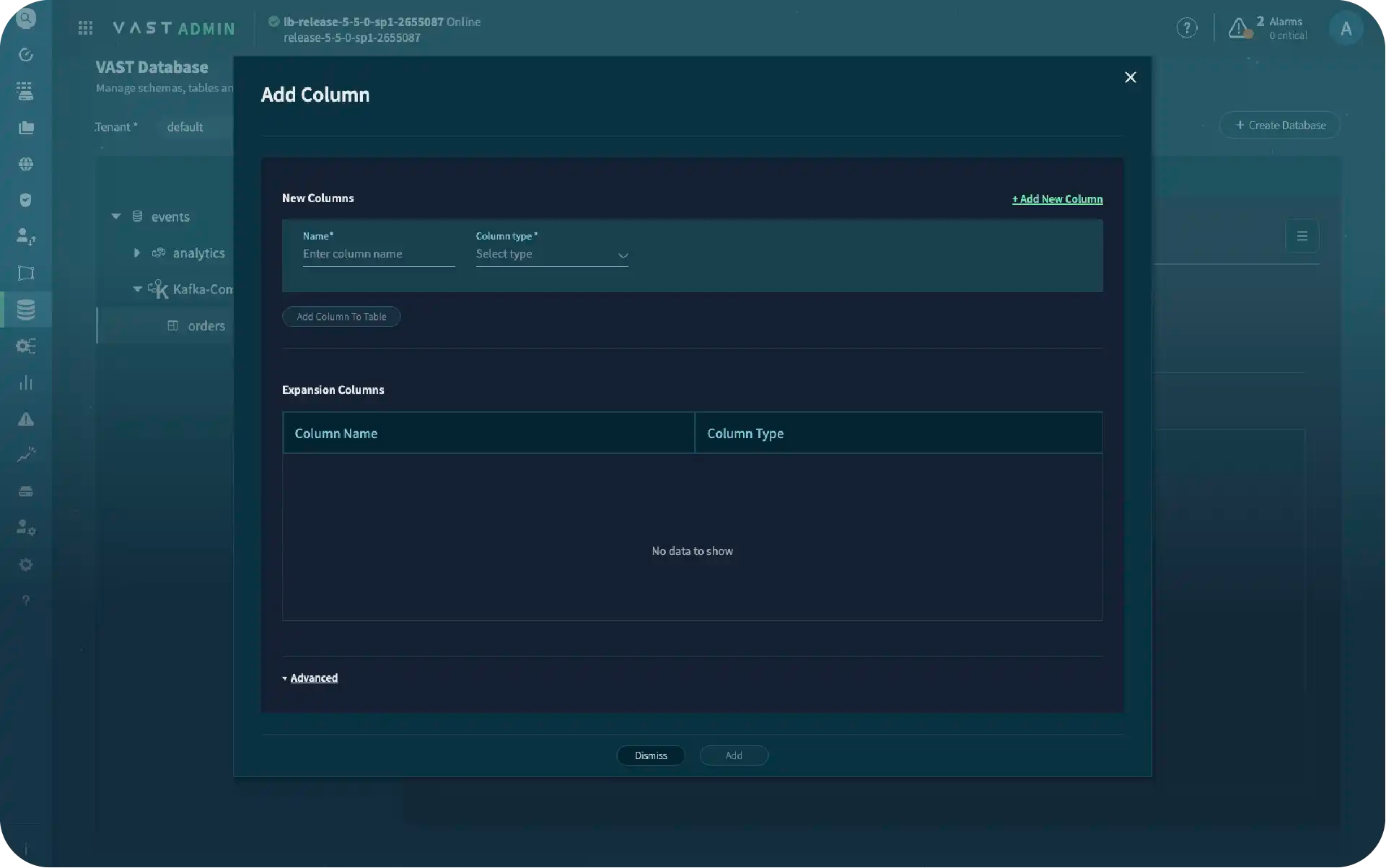
The Add Column dialog. Each field is given a name and an Arrow type.
The same configuration can be created with a single SDK call on the topic table:
expansion_schema = pa.schema([
    ("order_id",    pa.int64()),
    ("customer_id", pa.int64()),
    ("amount",      pa.float64()),
    ("currency",    pa.string()),
    ("status",      pa.string()),
    ("event_ts",    pa.string()),
])

with sess.transaction() as tx:
    topic = tx.bucket("events").schema("kafka_topics").table("orders")
    topic.create_blob_expansion(
        expansion_schema    = expansion_schema,
        target_table_name   = "orders_expanded",
        target_table_schema = "analytics",
        source_column_name  = "value",
    )   # format defaults to JSON; a BlobExpansionConfig can flip on
        # "flatten nested structs", "copy original message", etc.
When the call completes, the topic shows the expansion mapping and the target table contains the declared columns together with the operational columns described in part 1:
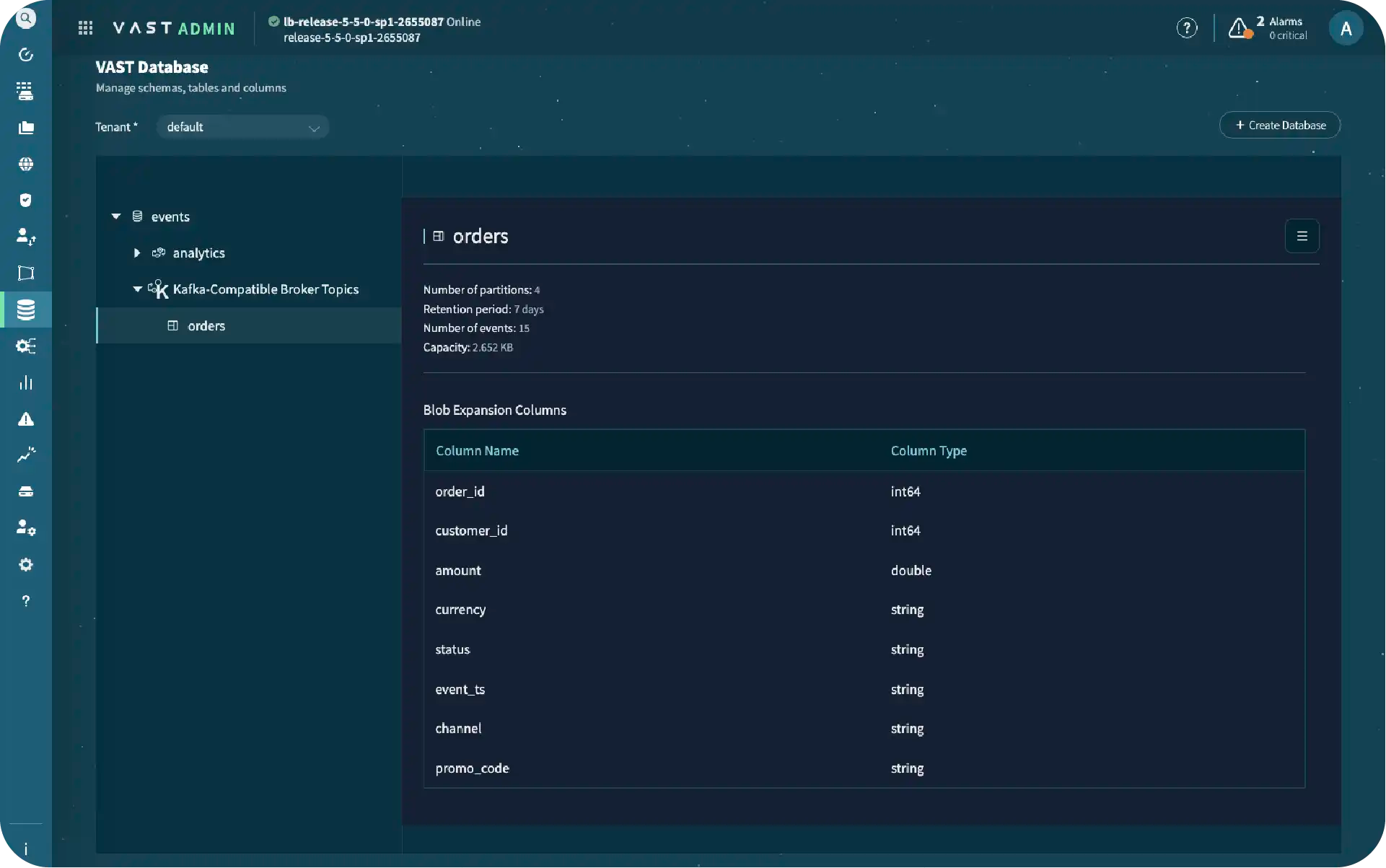
The orders topic and its Blob Expansion columns The target table contains 18 columns for the six fields declared above.
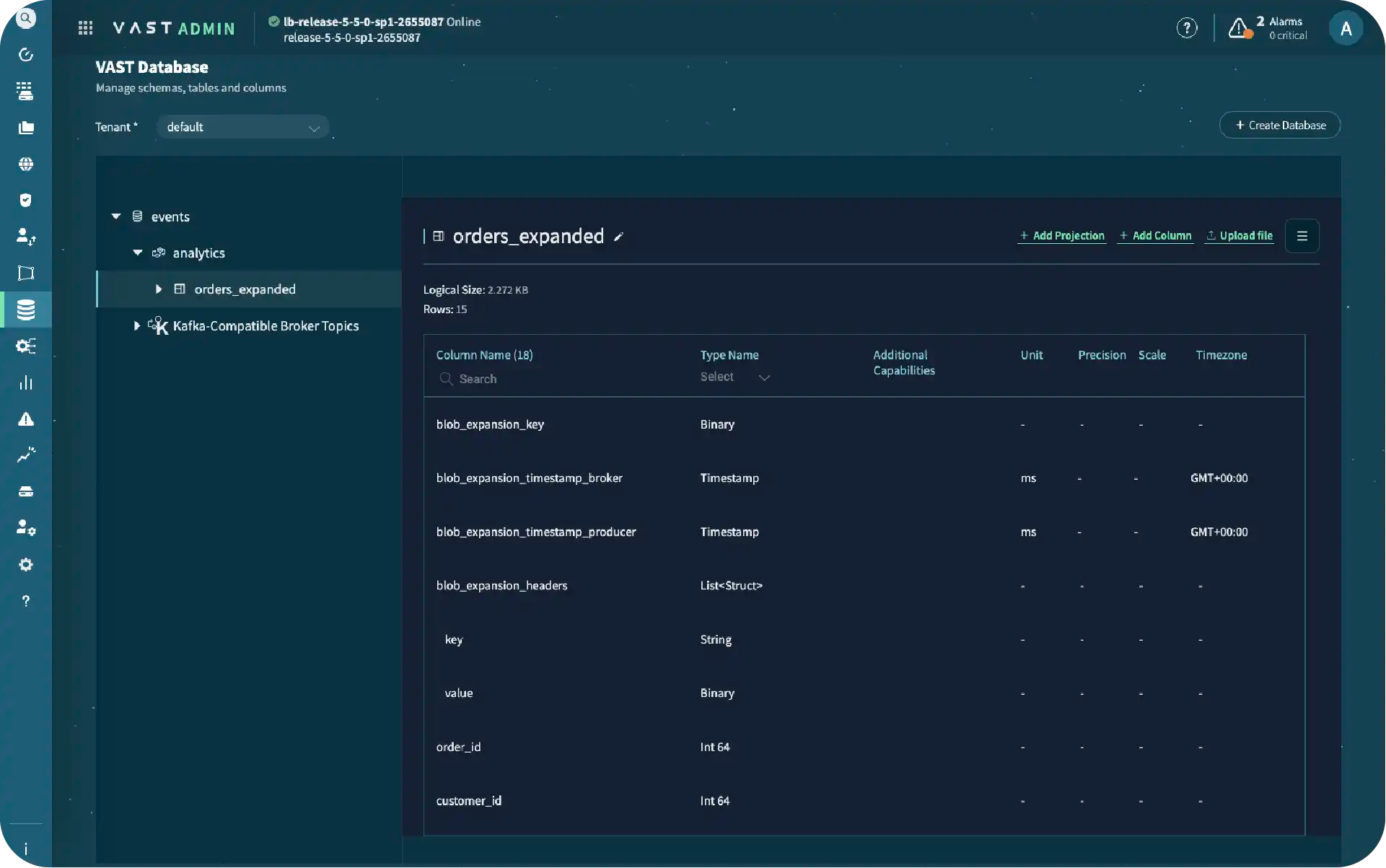
orders_expanded: declared columns and copied Kafka columns
The remaining columns contain diagnostic information and partition/offset information used to trace rows back to the source message.
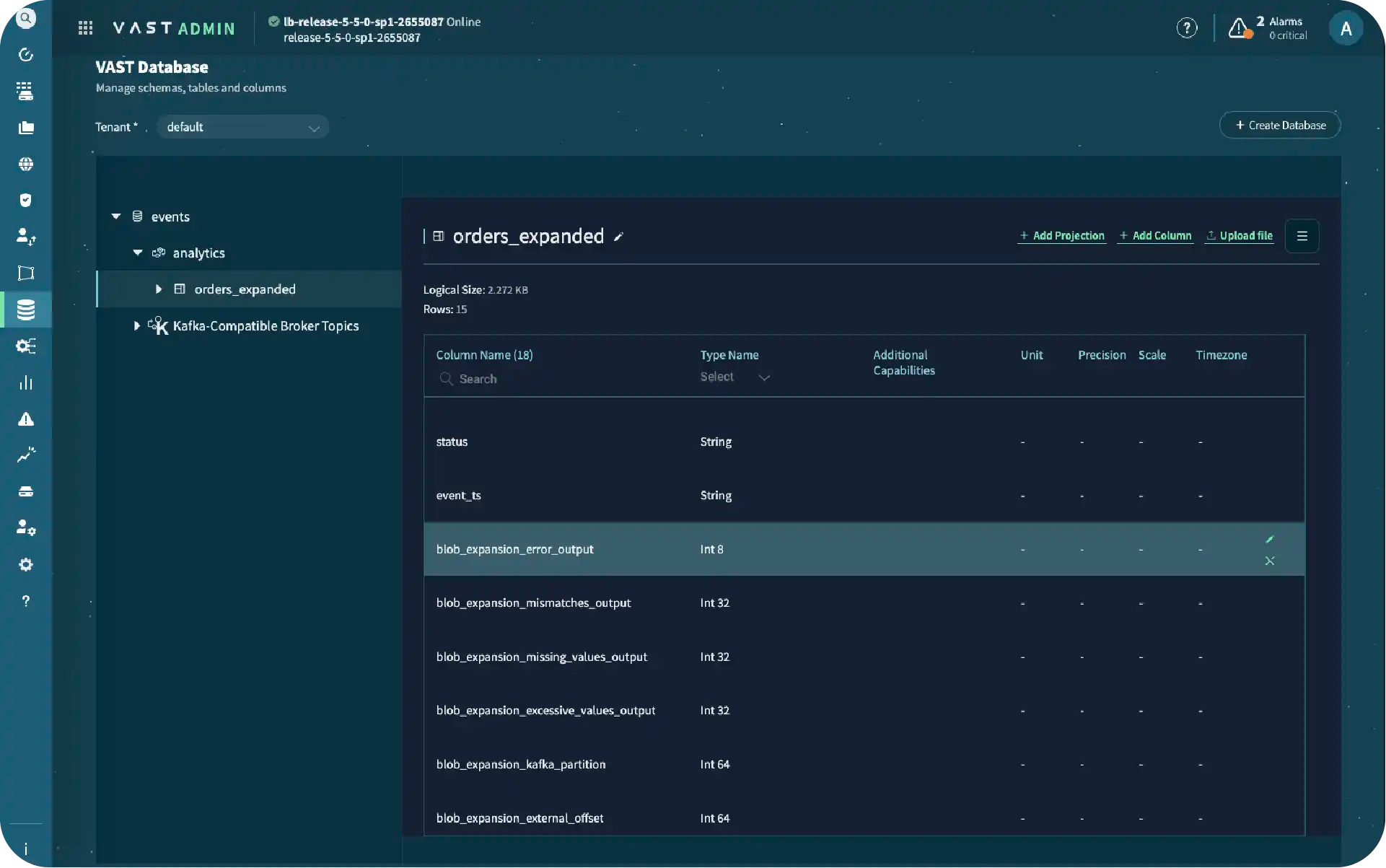
Additional diagnostic and partition/offset columns
Each row contains the typed fields, Kafka key, headers and timestamps, plus blob_expansion_kafka_partition and blob_expansion_external_offset. These fields identify the source partition and offset. The table also contains four diagnostic counters, which we use in the next section.
5. Produce JSON, Query Columns
Produce a small set of well-formed orders. The complete list is in the appendix:
from kafka import KafkaProducer
import json

p = KafkaProducer(bootstrap_servers=BOOT, api_version=(2, 0, 0), acks=1)
for o in orders:                       # plain dicts
    p.send("orders", json.dumps(o).encode())
p.flush()
No consumer or separate processing job is required. Once the messages are produced, the rows are already available in orders_expanded as typed columns, with all parse diagnostics at zero:
order_id | customer_id | amount | currency | status |
2001 | 42 | 129.99 | USD | paid |
2002 | 7 | 19.50 | USD | pending |
2003 | 42 | 249.00 | EUR | shipped |
2004 | 88 | 5.00 | USD | refunded |
2005 | 42 | 74.25 | GBP | paid |
2006 | 13 | 420.00 | USD | paid |
2007 | 42 | 8.99 | USD | pending |
2008 | 7 | 15.00 | EUR | shipped |
Because customer_id is stored as an int64 column, the predicate can be applied to that column rather than scanning the original blob:
with sess.transaction() as tx:
    t = tx.bucket("events").schema("analytics").table("orders_expanded")
    hits = t.select(columns=["order_id","amount","status"],
                    predicate=(t["customer_id"] == 42)).read_all()
WHERE customer_id = 42  ->  4 rows  (predicate pushdown)
  order_id: [2001, 2003, 2005, 2007]
  amount:   [129.99, 249.0, 74.25, 8.99]
  status:   ['paid', 'shipped', 'paid', 'pending']
The clean batch is the easy case. In practice, topics carry messages from many producers, and some of them will be wrong: a missing field, a string where a number should be, or a payload cut off partway through. The next test is what happens to those.
6. Bad Data Does Not Stop the Stream
Next, send five deliberately malformed messages to the same topic:
# | message | problem |
3001 | amount: "free" | type mismatch (string where a number is expected) |
3002 | no status field | missing a declared field |
3003 | extra coupon, tax fields | fields with no expansion definition |
3004 | {"order_id": 3004, "customer_id": 42, "amount": | not valid JSON at all |
3005 | customer_id:"VIP", amount:"lots", no status/currency, extra field | several at once |
All five messages produce rows. None is rejected by the expansion. The diagnostic columns record which fields could not be parsed or did not match the declared schema:
order_id | customer | status | error | mismatch | missing | excess |
3001 | 42 | paid | 0 | 1 | 0 | 1 |
(invalid JSON) | – | – | 1 | 0 | 0 | 0 |
3002 | 9 | – | 0 | 0 | 1 | 0 |
3003 | 9 | paid | 0 | 0 | 0 | 2 |
3005 | – | – | 0 | 2 | 2 | 3 |
The four diagnostic columns are: error, which maps to blob_expansion_error_output and indicates a parse failure; mismatch, which counts type mismatches; missing, which counts declared fields that are absent; and excess, which counts fields present in the message but not declared in the expansion.
The results can be read as follows:
3005 had two type mismatches, two missing declared fields and three undeclared fields , all counted, order_id still parsed.
3003 was perfectly valid; it just carried two fields we never asked for (coupon, tax) → excessive = 2.
3002 was missing status → missing = 1, and status is simply null.
The invalid JSON message could not be parsed, so blob_expansion_error_output is 1 and the declared fields are null. The row is still present, and the original message remains in the topic at its source offset.
3001 put a string in a numeric field → mismatches = 1, amount is null.
These columns can also be aggregated to produce a simple health summary. This is the same information exposed by the built-in expansion report for the definition:
EXPANSION HEALTH  rows=15  clean=14  rows_with_parse_error=1
totals: type_mismatches=3  missing_fields=3  excessive_fields=6
7. Evolve the Schema Without Recreating Anything
Suppose a new payload field is introduced, such as channel or promo_code. Add the fields to the existing expansion. There is no need to recreate the expansion or modify existing rows.
with sess.transaction() as tx:
    topic = tx.bucket("events").schema("kafka_topics").table("orders")
    topic.blob_expansion().add_columns(
        pa.schema([("channel", pa.string()), ("promo_code", pa.string())]))
In the GUI it is the same menu , Add Columns / Remove Columns / Delete:
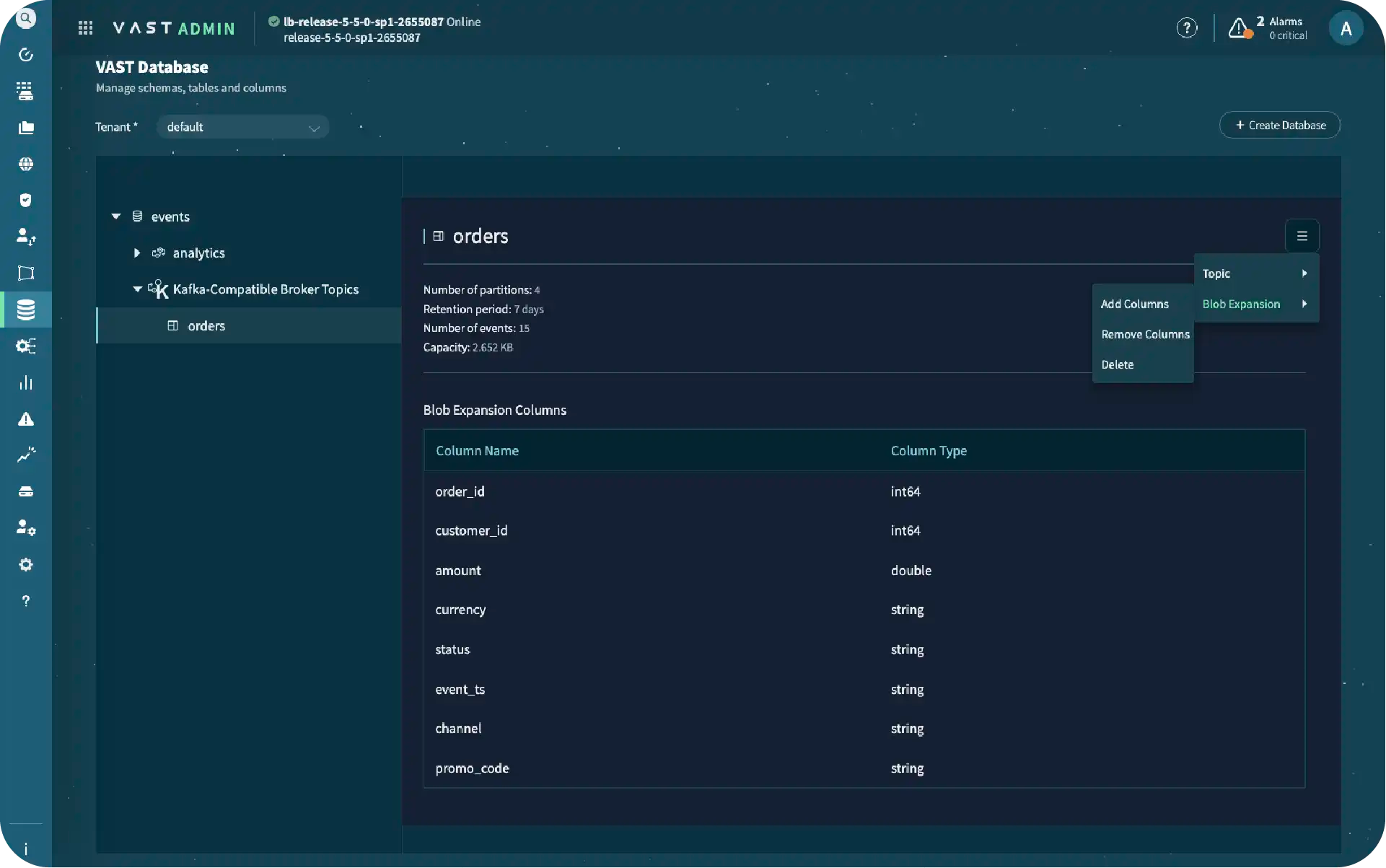
Blob Expansion lifecycle: add, remove, delete
New orders populate the new columns. Existing rows retain null for those columns. The system does not rewrite the existing rows:
order_id | customer_id | status | channel | promo_code |
4001 | 42 | paid | mobile | WELCOME10 |
4002 | 5 | paid | web | FREESHIP |
2001 | 42 | paid | – | – |
3003 | 9 | paid | – | – |
Rows 4001 and 4002 were produced after the columns were added, so they contain values for the new fields. Rows 2001 and 3003 predate the change and contain nulls. Once channel and promo_code are declared, those fields are no longer counted as excess fields.
What You End Up With
The result is a Kafka-compatible ingest path and a queryable VAST DataBase table without a separate consumer or stream-processing job to parse and materialize the JSON. Kafka clients continue producing to the topic normally, while Blob Expansion converts the incoming JSON into typed columns as part of ingestion. Source partition and offset are retained for traceability, and diagnostic columns identify records that do not conform to the declared schema.
Produce JSON to the topic and query the resulting columns from the table. No separate flattening job is required.
APPENDIX: The Sample Data
The clean batch from §5, stored as orders.json with one JSON object per line:
{"order_id": 2001, "customer_id": 42, "amount": 129.99, "currency": "USD", "status": "paid",     "event_ts": "2026-09-16T13:20:01Z"}
{"order_id": 2002, "customer_id": 7,  "amount": 19.50,  "currency": "USD", "status": "pending",  "event_ts": "2026-09-16T13:20:02Z"}
{"order_id": 2003, "customer_id": 42, "amount": 249.00, "currency": "EUR", "status": "shipped",  "event_ts": "2026-09-16T13:20:03Z"}
{"order_id": 2004, "customer_id": 88, "amount": 5.00,   "currency": "USD", "status": "refunded", "event_ts": "2026-09-16T13:20:04Z"}
{"order_id": 2005, "customer_id": 42, "amount": 74.25,  "currency": "GBP", "status": "paid",     "event_ts": "2026-09-16T13:20:05Z"}
{"order_id": 2006, "customer_id": 13, "amount": 420.00, "currency": "USD", "status": "paid",     "event_ts": "2026-09-16T13:20:06Z"}
{"order_id": 2007, "customer_id": 42, "amount": 8.99,   "currency": "USD", "status": "pending",  "event_ts": "2026-09-16T13:20:07Z"}
{"order_id": 2008, "customer_id": 7,  "amount": 15.00,  "currency": "EUR", "status": "shipped",  "event_ts": "2026-09-16T13:20:08Z"}
The five deliberately malformed messages from §6. The fourth entry is invalid JSON and is sent to the topic as raw bytes:
bad = [
    {"order_id": 3001, "customer_id": 42,    "amount": "free", "currency": "USD", "status": "paid"},  # type mismatch
    {"order_id": 3002, "customer_id": 9,     "amount": 60.00,  "currency": "USD"},                    # missing status
    {"order_id": 3003, "customer_id": 9,     "amount": 12.00,  "currency": "USD", "status": "paid",
     "coupon": "SUMMER", "tax": 1.2},                                                                 # extra fields
    b'{"order_id": 3004, "customer_id": 42, "amount":',                                               # malformed JSON
    {"order_id": 3005, "customer_id": "VIP", "amount": "lots", "extra": True},                        # several at once
]
For the dictionary entries, use the §5 producer loop. Send the raw-bytes entry directly.
Learn More
The feature and broker: VAST Cluster 5.5.0 release notes Publishing events to the VAST Event Broker
Manage a Blob Expansion: CLI: blobexpansion commands Python SDK: BlobExpansion resource data source
Background: Understanding the VAST Message Broker
Back to Part 1 for the design rationale, performance considerations, and the scope of the first release. JSON is supported today; additional formats are on the roadmap.